SCSI for the Mac 512K
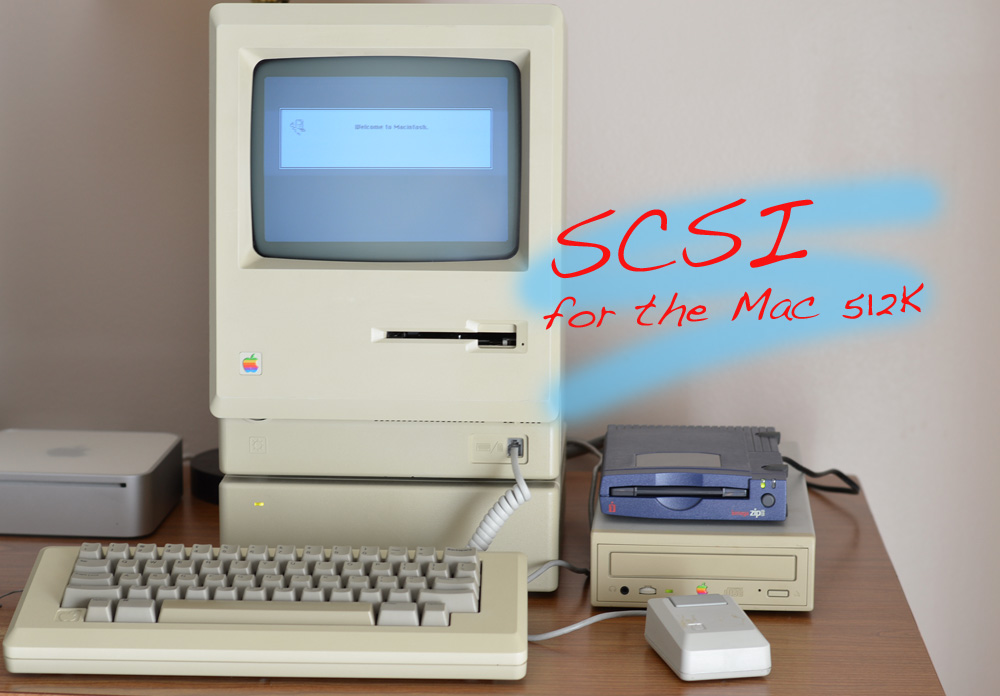
In the last article, we showed how to upgrade a Mac 512K or 512Ke to 1 or 2 MB of RAM. Upgrading the RAM in a Mac 512Ke with its 128K ROM and double-sided 800K Sony drive brings it one step closer to being a Macintosh Plus. In today's article, we're going to show how to complete the transformation (as much as possible) by adding a SCSI port which will allow your Mac 512Ke to use a Zip drive, CD-ROM, and even.... run System 7. 
Sound interesting?  Good, let's start with our familiar ritual of
A Brief History of SCSI on the Macintosh
SCSI originated with Shugart Associates' SASI interface, first developed in the 1970s, and finally standardized in the early 1980s by ANSI.
One of the first times we heard Macintosh and SCSI mentioned together publicly from Apple Computer was in the January 1985 press release for the Macintosh Office. Part of the description for Apple's planned network file server was "a standard SCSI peripheral interface to support hardware add-ons such as tape back-up and additional storage." This network server, which was based on a stripped-down Macintosh, never shipped, but we'll explore it in-depth in a future Mac 512K Blog article. However, it demonstrates that Apple engineers were working with SCSI at least by the end of 1984.
A few months later in March 1985, Randyll Burns wondered if Apple would use SCSI in their upcoming Turbo Mac project, the machine which led to the Macintosh Plus in 1986. He remarked, "I think it would be great to have a Mac with an SCSI interface. It would make the machine much more expandable."
Rumors and speculation surrounding SCSI continued, but not much of substance developed until May 1985, when John Bass revealed that he was working on a project to add SCSI to the Mac using an NCR 5380 SCSI controller.
Just two months later, John Bass announced MacSCSI was completed and ready for orders. He supplied a driver for the Xebec S1410 hard disk controller. The schematic and source code were published in Dr. Dobb's Journal, beginning September 1985, and continued in the October and December 1985 issues. We will cover the MacSCSI in-depth, showing how to build one, in a future Mac 512K Blog article.
Knock-offs and competing SCSI boards rapidly proliferated, much like RAM upgrade boards for the Mac 512K, available from many different sources and suppliers. John Bass even went so far as to claim that Apple referred to his SCSI board when designing the Macintosh Plus. This claim is unlikely, as the Macintosh Office press release from January 1985 showed that Apple engineers were working with SCSI at least by late 1984. Furthermore, Erich Ringewald wrote the SCSI Manager beginning September 6, 1985, according to comments in the source code.
In a post to the Delphi Mac Digest in May 1986, Steve Brecher also refuted John Bass's claim of influence by stating that "Apple had prototype designs with SCSI interfaces in 1984 and early 1985."
By November 1985, the new 128K ROM, code-named Lonely Hearts, was frozen. Pre-release copies of the ROM were made available to select hardware and software developers. The Macintosh Plus, the first model to ship with this new ROM, was released in January 1986, and now featured on-board SCSI powered by the same NCR 5380 controller.
With the SCSI Manager in ROM, the Mac Plus's implementation was far more versatile than John Bass's MacSCSI would ever be. The Mac Plus supported a wider array of SCSI devices, and could also boot directly from a SCSI device.
Because the Macintosh Plus placed the NCR5380 SCSI controller at a slightly different address in memory ($580000 instead of $500000), John Bass's MacSCSI board was incompatible with the SCSI Manager in the new ROM and had to be revised. Of course it still remained compatible with the driver that he had written for it months earlier, however.
SCSI in the 128K ROM
Despite being more compatible than John Bass' MacSCSI, the Macintosh Plus still was not without flaws. Early revisions of the 128K ROM had bugs in the SCSI drivers that could prevent the Macintosh from starting up from certain SCSI hard drives.
Apparently the SCSI Manager had only been tested with one or two hard drive controllers, and as a result, was not compatible with other brands. One of the problems is that when the Macintosh is switched on, it resets the SCSI bus. Some SCSI controllers will go into Unit Attention state, but the Mac Plus ROM does not properly handle this state, and thus will not boot from the drive.
The first revision of the 128K ROM would sometimes hang on boot if a connected SCSI device was not powered on. The workaround was to ensure that all connected SCSI devices were powered on before switching on the Macintosh. This bug was corrected in a later ROM revision.
There were three revisions of the 128K ROM, and all had the same part number. There are two ways to identify revision: for a Mac Plus, by looking at its serial number; for a 512Ke or Plus, using the mini debugger.
Macintosh Plus serial number begins with a letter: F for Fremont or C for Cork, its place of manufacture. The following digit is the last digit of the year of manufacture (ex. 7 = 1987). The next two digits are the week within that year. The next three characters are the serial number. The rest of the serial number (starting with the M) is the Macintosh model number.
If your Macintosh Plus has a serial number later than F609sssMxxxxx, the 9th week of 1986, then you have the revised ROMs.
To determine which ROM version you have via the mini debugger, first press the interrupt switch on the programmer's switch. Type DM 400000 and press Return.
If the third byte value on the top line displayed is EA, it means the revised ROMs; if it's EE, it means the original 128K ROMs. Type G to exit the mini debugger.
In Spring 1987, Apple released the final revision of Macintosh Plus ROMs. Note that all Macintosh Plus upgrade kits in 1986 were shipped with the revised ROMs.
Dove MacSnap SCSI
The MacSnap SCSI board adds a SCSI port to a Mac 512Ke, compatible with the SCSI Manager in ROM, and to software, appears just like SCSI in a Macintosh Plus. The MacSnap board sits in the two Macintosh ROM sockets, allowing it tap into the 68000's address and data bus lines, just like the original MacSCSI from John Bass.
The MacSnap SCSI board can be used with or without the MacSnap RAM expansion board. When both are installed, the edge of the SCSI board fits slightly under the MacSnap RAM board, as the photo below shows. The SCSI board sits in the two ROM sockets. The ROMs are relocated to the SCSI board.
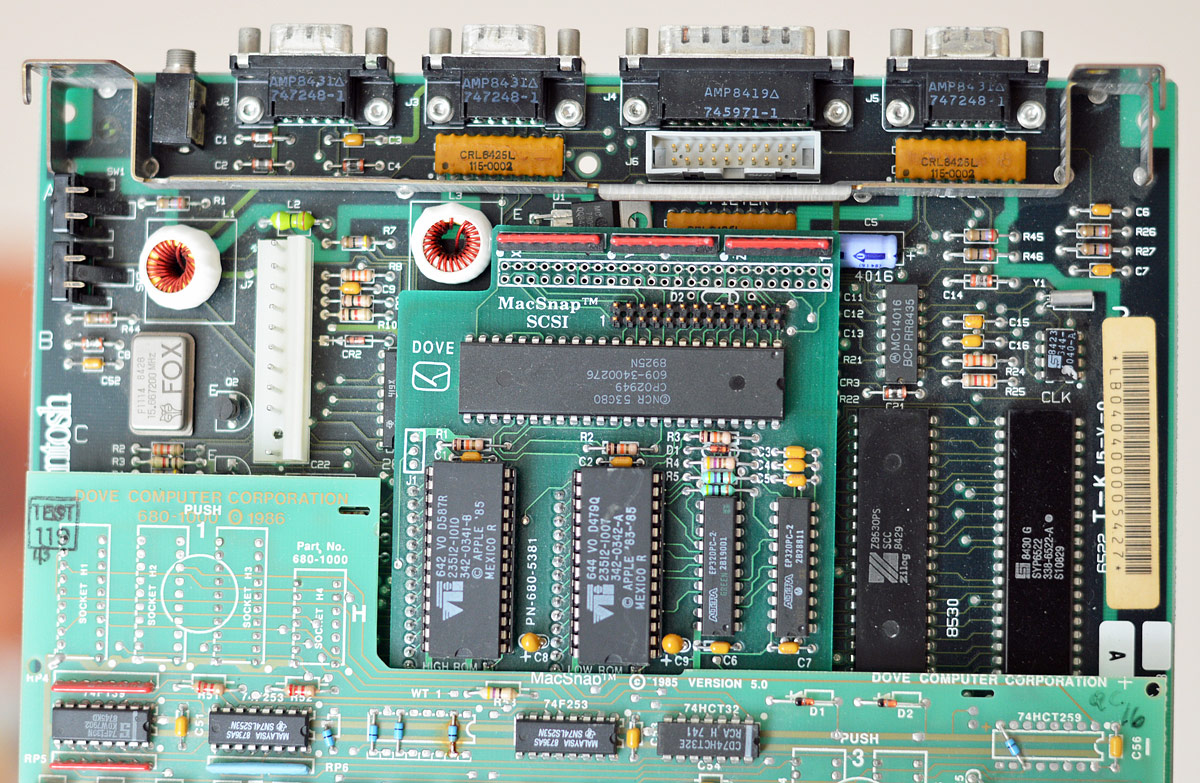
On the MacSnap SCSI board you will find a 26-pin IDC connector. A ribbon cable attaches to this and works its way out the battery compartment on the back of the Mac to provide Apple's standard non-standard 25-pin SCSI port (the industry standard was actually a 50-pin port).
If you want, there is space to solder a 50-pin male IDC header which would permit installation of an internal SCSI device, such as a hard drive. You could tap power from the analog board. I'm not going to show how to do all of that in this article, but there are a couple articles by others that show how to add an internal hard drive to a Macintosh Plus-era machine.
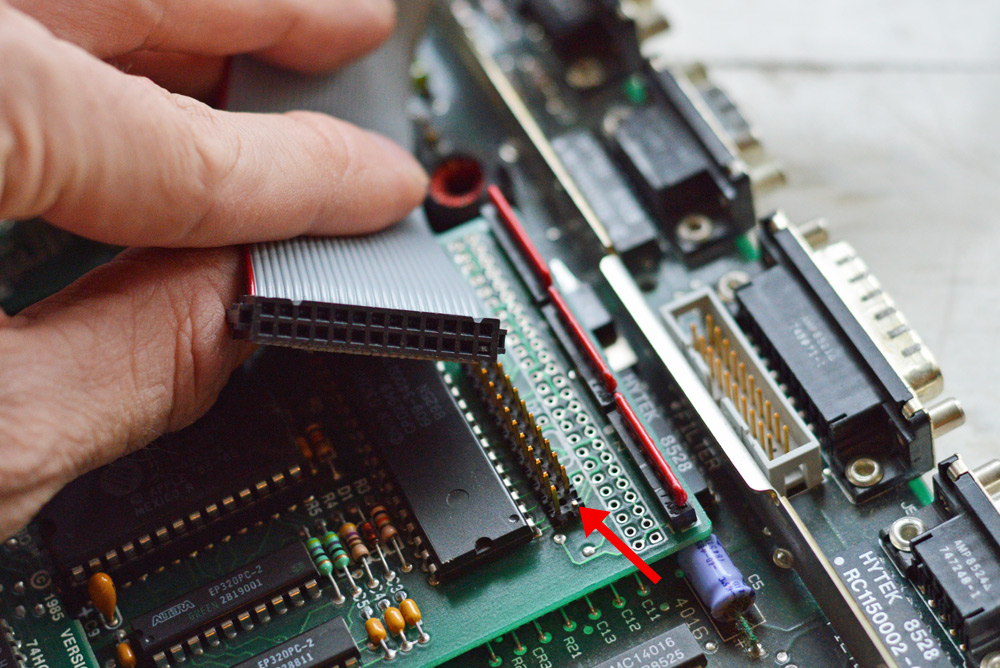
Now don't be alarmed if you notice that there's a pin missing on the 26-pin connector. That's by design, to ensure that you can't plug in the cable backwards! The arrow in the photo above shows this missing pin.
And below is my Mac 512Ke board with both MacSnap boards installed, and the SCSI port connected.
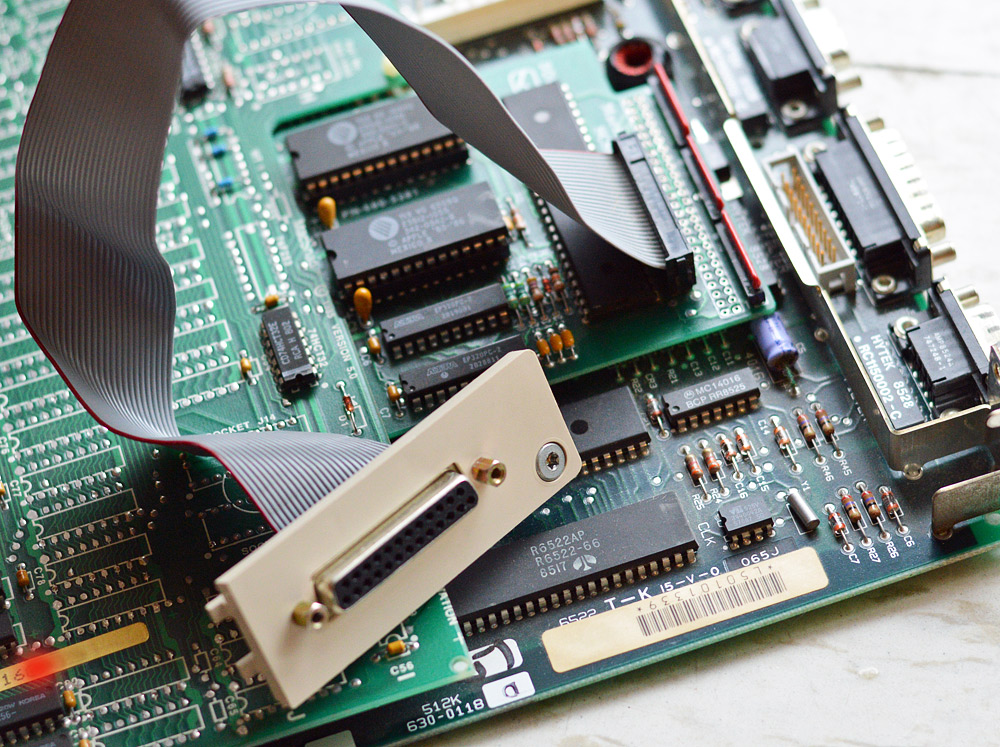
You will have to remove the battery cover on your Mac 512K and route the connector out the hole in the case. Put the battery cover somewhere careful so you don't lose it. Where's a good place? Tape it to the inside of the Mac case! Use some strong tape so it won't soon fall off. Or you can tape it to the metal frame, or on top of the floppy drive, or somewhere on the logic board. It's plastic, so it won't short anything.
Now as to routing the SCSI connector to the back of the Mac's case, it's rather fiddly. I've found the best method is with the Mac face down, to remove the PRAM battery and balance the rectangular SCSI port upright in the black battery holder, then carefully lower the case around it. If you have small enough fingers, you might be able to reach in through the hole in the case and grab the SCSI port. Otherwise you may have to use pliers or some tool to grab it.
Pay attention to the gray cable and make sure there is just enough of it coming past the battery holder, because the holder will clamp the cable.
Also, do not over tighten the screws, and especially this screw! Unless you think it's cool to crack the plastic. 
Finished result should look like this:
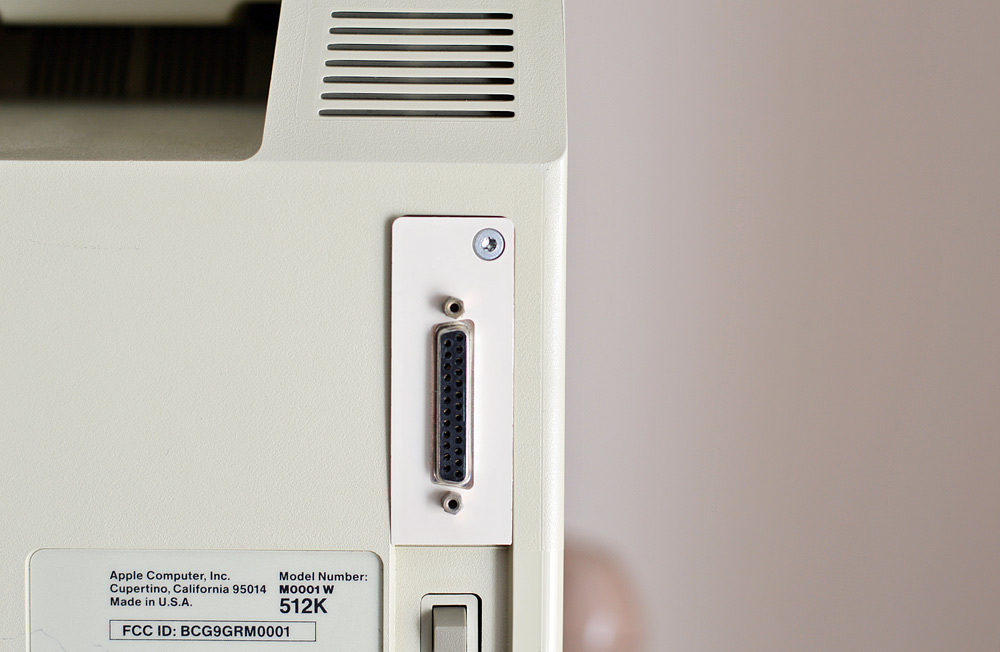
The plastic does not make a perfect fit with the Mac's case. Oh well. That's another reason not to over-tighten that screw!
With the SCSI port installed, let's get to work configuring the SCSI chain.
Configuring the SCSI Chain
Long-time Mac users will probably remember the term "SCSI voodoo." It describes the mysterious and seemingly arbitrary way that SCSI devices would only work at certain positions in the chain, or with certain terminators or termination settings or even SCSI device IDs.
If you've forgotten all this, well now you can experience these joys once again in your life! 
I have three working SCSI devices: a hard drive, an Apple CD-ROM 600e, and an Iomega Zip drive. I decided to start off simple, with just the SCSI hard drive connected.
This worked without a hitch. The Mac 512Ke starts up directly from this SCSI hard drive (which is in fact a converted Hard Disk 20 unit that we'll read about in the next blog article), and can read/write with no problem.
But let's try to attach some more devices to the chain. This is where it gets tricky!
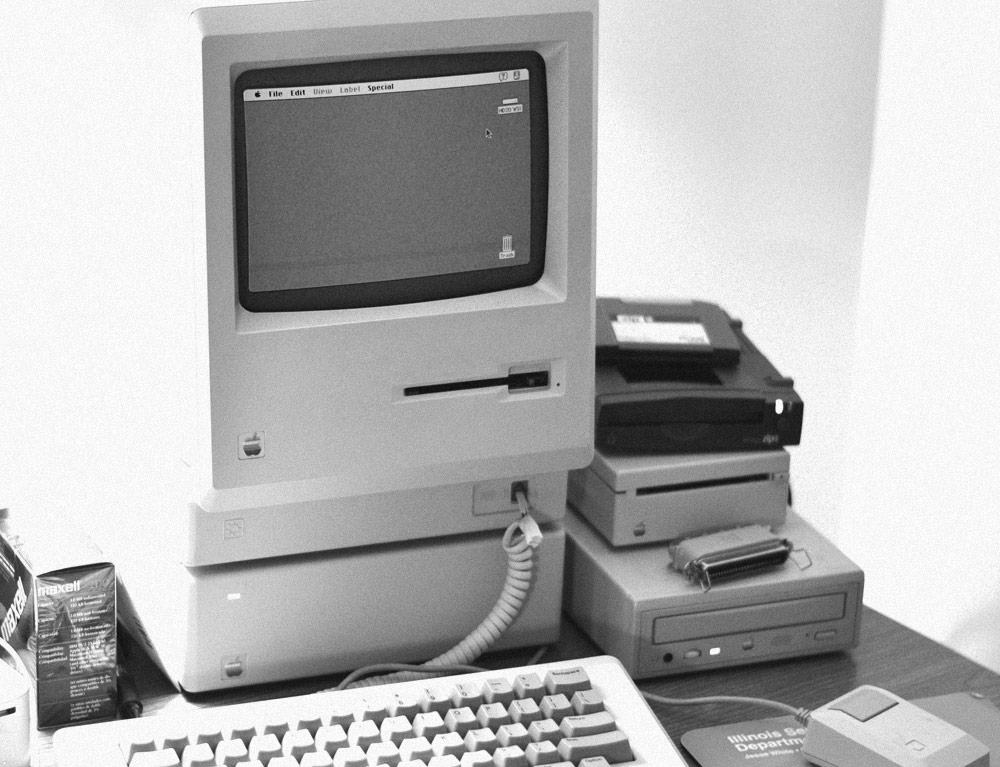
After trying several different arrangements, here is my working SCSI chain: Mac 512Ke --> Zip drive --> Hard disk --> AppleCD 600e --> terminator block
Termination is still not completely known. I know the AppleCD has no internal termination whatsoever, so it gets a terminator block as the last device on the chain. The Zip drive has an on/off switch for termination. The MacSnap SCSI board is terminated, as I see a row of red resistor packs. But as for whether or not the hard disk is terminated, I do not know.
Termination will probably be your biggest struggle.
The Macintosh Plus does not have any internal termination for SCSI, while the Mac SE and Mac II only have internal termination if they have an internal hard disk. All SCSI chains require at least one termination. However, if your chain has more than one device, then you need termination at both ends of the SCSI bus. Devices with termination must be powered on.
If your termination is wrong, the Mac 512Ke will not boot from a CD-ROM. You'll see the LED on the AppleCD 600e drive turn to yellow to indicate access, but nothing more happens. But with correct termination and a properly-formatted CD, you can boot from a CD. The "Apple Macintosh CD" with black and white label will load on a Mac 512Ke.
I could not get my Mac 512Ke to boot at all when a Zip disk is inserted in the Zip drive. The effect is rather explosive, actually: flashing screen and harsh, static-like noise from the speaker! No permanent damage, fortunately. The solution is to instead insert your Zip disk after the Happy Mac icon has appeared on the screen.
SCSIProbe 4.3 by Robert Polic can detect whether your chain is terminated or not.
The Macintosh Plus Experience, System 7, and Necessary Drivers
Now that all is said and done, have I succeeded in upgrading my lowly Mac 512Ke into a Macintosh Plus? Let's look at what I have so far:
- 800K double-sided Sony drive
- 128K ROM
- SCSI
- 2 MB of RAM
But they would be mistaken.

The Macintosh Plus included one other enhancement that is largely overlooked and forgotten! I refer to Extended PRAM, also called XPRAM for short. The original Macintosh had just 20 bytes of PRAM which was integrated into Apple's custom-made realtime clock chip. The Macintosh Plus has a new clock chip that has 256 bytes of parameter RAM.
Now you can run System 6 and System 7 on the Mac 512Ke and generally get along just fine. But you'll find that some Control Panels, such as Sound, won't work.
Scott Armitage wrote a solution in 1988. His 512KE XPRAM INIT will make your Mac 512Ke think that it has extended PRAM by storing this extra information somewhere else instead. A small bit of data is appended to the System file and is read from and written to instead of the XPRAM. This INIT requires System 6 or later.
Running System 7
SCSI and 2 MB of RAM. If your Mac has these, then you can run System 7. Now how to get it on 800K disks? That's a bit of a problem. I used XMODEM to transfer a minimal v7.1 System and Finder combination to the Mac 512Ke's hard disk. This serial transfer took around an hour.
 And it was only 1.5 MB.
 When you boot System 7 for the first time, you may see the Mac restart and chime again after the happy Mac. That's System 7 initializing the PRAM for the first time. You will also have your desktop file rebuilt, as System 7 stores the desktop database in a different format.
After that, the main thing you'll notice about System 7 is that it is: a.) considerably slower than System 6, and b.) uses up much more RAM. System 7.5 requires 4 MB!
But if you absolutely need System 7 to run some application, well now you can do it on your Mac 512Ke!

Necessary Drivers
Here's what I'm using under System 7.1 for my SCSI devices:
Iomega Driver v5.0.3 - this is for the Zip drive. There are many more versions in the Vault.
Apple CD-ROM v5.0.1 - this came from System 7.5.
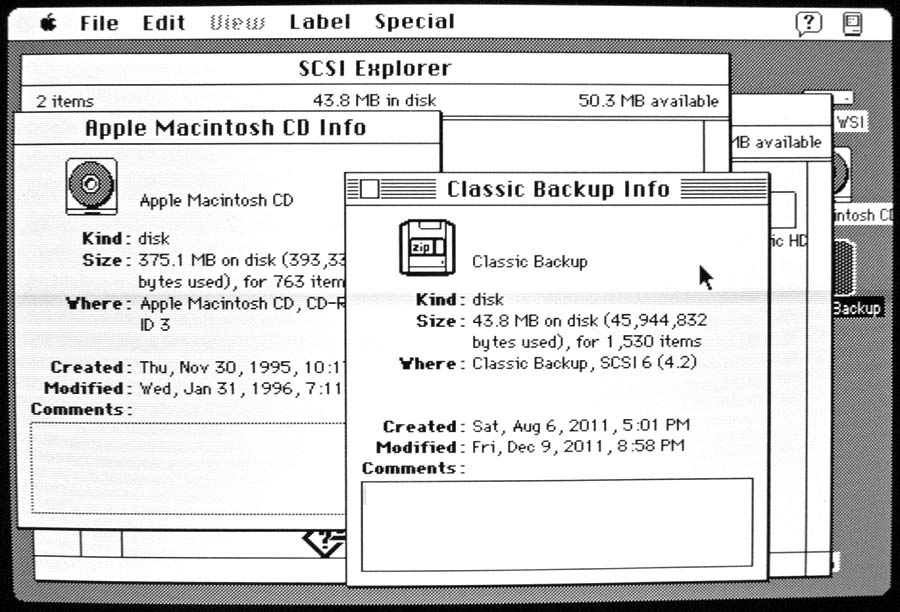
The screenshot below shows my SCSI hard disk, Zip disk, and CD-ROM all mounted on my Mac 512Ke running System 7.1. It's a strange world sometimes.
That's all for this Mac 512K Blog article. The next one will show and tell all about the PCPC SCSI upgrade for the Macintosh Hard Disk 20, the hard drive that I've been using now with my 512Ke.
| The Mac 512K Blog wrote: |
| This blog chronicles the Macintosh 512K and my projects with it. We will test software, fix hardware, program it, hack it, and generally take the 512K Macintosh to its limits. Do leave any feedback you may have by posting a comment to this article. |